Reg-client don’t find MockMDS devices. 0 devices discovered

I try to add Mock MDS device to Reg-client.

I followed:

Now I have user “devicepartner1” with roles: default-roles-mosip, DEVICE_PROVIDER, offline_access, uma_authorization.

Also, I have user “operator01” with roles: Default, GLOBAL_ADMIN, offline_access, REGISTRATION_OPERATOR, REGISTRATION_SUPERVISOR, uma_authorization, ZONAL_ADMIN.
In admin-ui I have added resources: Center, machine and map operator01 to the new center and the new zone.

select * from mosip_keymgr.ca_cert_store where cert_subject like ‘%CN=devicepartner1%’
gives me RootCA cert, Intermediate cert and 3 certificates where cert_issuer is MOSIP-TECH-CENTER (PMS):


select * from mosip_master.ca_cert_store where cert_subject like ‘%CN=devicepartner1%’
gives me the same:

When I start MoskMDS I get in logs:

12:12:30.881 [main] DEBUG org.jose4j.jwa.AlgorithmFactoryFactory - Initialized jose4j in 523ms

Because I use self-signed certificates for mosip host, I add next params in command line, when running reg-client:
-Djavax.net.ssl.trustStore=%regpath%mosip-truststore-sha1.jks

-Djavax.net.ssl.trustStorePassword=XXXXX

I try to run reg-client in 2 versions:
Version 1. If I run \reg-client>run.bat
Devices scanning not start, no new messages in MockMDS.
In registration.log:

12:25:16 INFO ClientSetupValidator : Loaded props/mosip-application.properties
12:25:17 INFO SoftwareUpdateUtil : invoking https://regclient.mosip.mosip.local.com/.../MANIFEST.MF
12:25:18 INFO ClientSetupValidator : Checksum validation completed, no patch
12:25:18 INFO ClientIntegrityValidator : Integrity check passed for registration jars
12:25:23 INFO DaoConfig : Setting up datasource, Derby security check OK
12:25:24 INFO TPMClientCryptoServiceImpl : TPM asymmetric key created in 9s
12:25:37 INFO KeyStoreImpl : Loaded OLKeyStoreImpl
12:25:39 INFO RestartController : Sync restart timer started
12:25:40 INFO SoftwareUpdateHandler : Current version 1.2.0.2, no backup found
12:25:40 INFO GlobalParamServiceImpl : Fetched global params
12:25:40 INFO ServiceDelegateUtil : Network check https://api-internal.mosip.mosip.local.com/v1/syncdata/actuator/health
12:25:41 INFO ClientApplication : Login screen initialized and loaded
12:25:47 INFO LoginController : Validating credentials
12:25:50 INFO UserDetailDAOImpl : User not found, userFound=false
12:25:51 INFO AuthTokenUtilService : Fetching Auth Token via PASSWORD
12:25:56 INFO TPMClientCryptoServiceImpl : Completed TPM signing key creation
12:25:56 INFO AuthTokenUtilService : Calling https://api-internal.mosip.mosip.local.com/v1/syncdata/authenticate/useridpwd
12:25:57 INFO LoginServiceImpl : Initial sync start
12:25:57 INFO PolicySyncServiceImpl : getCertificate request {applicationId=KERNEL, referenceId=SIGN}
12:25:57 INFO RestClientAuthAdvice : Adding authZ token to header
12:25:58 ERROR RestClientAuthAdvice : UNKNOWN ERROR >> 500 Internal Server Error on getCertificate
org.springframework.web.client.HttpServerErrorException: 500 Internal Server Error
	at io.mosip.registration.util.restclient.RestClientUtil.invokeURL(RestClientUtil.java:68)
Caused by: io.mosip.registration.exception.RegBaseCheckedException: UNKNOWN_ERROR --> 500 Internal Server Error
	at io.mosip.registration.util.advice.RestClientAuthAdvice.addAuthZToken(RestClientAuthAdvice.java:86)
...
12:25:58 ERROR PolicySyncServiceImpl : java.lang.reflect.UndeclaredThrowableException
	at io.mosip.registration.util.restclient.ServiceDelegateUtil.get(ServiceDelegateUtil.java:148)
Caused by: io.mosip.registration.exception.RegBaseCheckedException: UNKNOWN_ERROR --> 500 Internal Server Error
...
12:25:58 ERROR LoginServiceImpl : REG-SYN-002 --> PublicKey Sync failed
	at io.mosip.registration.service.login.impl.LoginServiceImpl.initialSync(LoginServiceImpl.java:320)
Caused by: RegBaseCheckedException: UNKNOWN_ERROR --> 500 Internal Server Error
...
12:25:58 INFO AlertController: Alert generation started and ended
12:26:11 INFO AlertController : Alert closing started and ended
12:26:11 INFO SoftwareUpdateHandler : Version check 1.2.0.2
12:26:11 INFO PageFlow : Preparing page flow map for New Registration, Onboard, UIN Update
12:26:11 INFO SoftwareUpdateHandler : Checking for updates via https://regclient.mosip.mosip.local.com/.../maven-metadata.xml
12:26:11 INFO GlobalParamServiceImpl : SoftwareUpdate flag updated

And with operator01 credentials I can’t login to reg-client.

Version 2. When I start registration-test-utility, in MockMDS logs I see next:

12:49:16.600 [Thread-0] INFO io.mosip.mock.sbi.service.SBIWorker - Request data :: MOSIPDINFO /info HTTP/1.1Host: 127.0.0.1:4501Connection: Keep-AliveUser-Agent: Apache-HttpClient/4.5.7 (Java/11.0.8)Accept-Encoding: gzip,deflate
12:49:16.600 [Thread-0] INFO io.mosip.mock.sbi.service.SBIWorker - Method Name :: MOSIPDINFO
12:49:16.600 [Thread-0] INFO io.mosip.mock.sbi.service.SBIWorker - Method Valid ::
12:49:16.632 [Thread-0] INFO io.mosip.mock.sbi.devicehelper.SBIDeviceHelper - Keystore already cached, nothing to load :: C:\Users\DIL\IdeaProjects\mosip\sourcecode\mosip-mock-services\MockMDS\target
12:49:16.774 [Thread-0] INFO io.mosip.mock.sbi.service.SBIWorker - Response data :: HTTP/1.1 200 OK
Access-Control-Allow-Headers:DNT,X-Mx-ReqToken,Keep-Alive,User-Agent,X-Requested-With,If-Modified-Since,Cache-Control,Content-Type,X-PINGOTHER,Authorization
Access-Control-Allow-Origin: *
Access-Control-Allow-Methods: "OPTIONS, RCAPTURE, CAPTURE, MOSIPDINFO, MOSIPDISC, STREAM, GET, POST"
Access-Control-Allow-Credentials: true
CACHE-CONTROL:no-cache
Content-Length: 27154
Content-Type: application/json
LOCATION: HTTP://127.0.0.1:4501/
Connection: close
[{"deviceInfo":"eyJ4N","error":{"errorCode":"0","errorInfo":"Success"}},{"deviceInfo":"ey","error":{"errorCode":"0","errorInfo":"Success"}},{"deviceInfo":"eyJ","error":{"errorCode":"0","errorInfo":"Success"}}]

12:49:16.790 [Thread-1] INFO io.mosip.mock.sbi.service.SBIWorker - Request data :: MOSIPDINFO /info HTTP/1.1Host: 127.0.0.1:4501Connection: Keep-AliveUser-Agent: Apache-HttpClient/4.5.7 (Java/11.0.8)Accept-Encoding: gzip,deflate
12:49:16.790 [Thread-1] INFO io.mosip.mock.sbi.service.SBIWorker - Method Name :: MOSIPDINFO
12:49:16.790 [Thread-1] INFO io.mosip.mock.sbi.service.SBIWorker - Method Valid ::
12:49:16.800 [Thread-1] INFO io.mosip.mock.sbi.devicehelper.SBIDeviceHelper - Keystore already cached, nothing to load :: C:\Users\DIL\IdeaProjects\mosip\sourcecode\mosip-mock-services\MockMDS\target
12:49:16.853 [Thread-1] INFO io.mosip.mock.sbi.service.SBIWorker - Response data :: HTTP/1.1 200 OK
Access-Control-Allow-Headers:DNT,X-Mx-ReqToken,Keep-Alive,User-Agent,X-Requested-With,If-Modified-Since,Cache-Control,Content-Type,X-PINGOTHER,Authorization
Access-Control-Allow-Origin: *
Access-Control-Allow-Methods: "OPTIONS, RCAPTURE, CAPTURE, MOSIPDINFO, MOSIPDISC, STREAM, GET, POST"
Access-Control-Allow-Credentials: true
CACHE-CONTROL:no-cache
Content-Length: 27154
Content-Type: application/json
LOCATION: HTTP://127.0.0.1:4501/
Connection: close
[{"deviceInfo":"eyJ4N","error":{"errorCode":"0","errorInfo":"Success"}},{"deviceInfo":"ey","error":{"errorCode":"0","errorInfo":"Success"}}]

And in registration.log:

14:07:53,631 INFO  DaoConfig : Setting up datasource
14:07:53,647 INFO  TPMClientCryptoServiceImpl : Instantiating Platform TPM
14:08:03,935 INFO  TPMClientCryptoServiceImpl : Asymmetric Key Creation completed (10s)
14:08:04,820 INFO  DaoConfig : Security setup check complete & success
14:08:07,685 INFO  KeyStoreImpl : Loaded offline keystore impl
14:08:10,054 INFO  BioAPIFactory : Initializing mockvendor SDK (FACE/FINGER/IRIS)
14:08:10,314 INFO  RestartController : Restart Timer started
14:08:11,161 INFO  SoftwareUpdateHandler : Version 1.2.0.2 verified
14:08:11,406 INFO  ServiceDelegateUtil : Health check https://api-internal.mosip.mosip.local.com/v1/syncdata/actuator/health
14:08:11,645 INFO  PolicySyncServiceImpl : getCertificate {applicationId=KERNEL, referenceId=SIGN}
14:08:11,681 ERROR RestClientAuthAdvice : 500 Internal Server Error
	at io.mosip.registration.util.restclient.RestClientUtil.invokeURL(RestClientUtil.java:68)
Caused by: io.mosip.registration.exception.RegBaseCheckedException: UNKNOWN_ERROR --> 500 Internal Server Error
	at io.mosip.registration.util.advice.RestClientAuthAdvice.addAuthZToken(RestClientAuthAdvice.java:86)

14:08:11,685 ERROR LoginServiceImpl : REG-SYN-002 --> PublicKey Sync failed
	at io.mosip.registration.service.login.impl.LoginServiceImpl.validateResponse(LoginServiceImpl.java:392)

14:08:11,691 INFO  JobConfigurationServiceImpl : Initiating Sync Jobs
14:08:11,763 INFO  JobConfigurationServiceImpl : Scheduler initialized, jobs loaded successfully
14:08:11,855 INFO  MosipDeviceSpecificationFactory : Checking device info ports 4501–4600
14:08:12,124 INFO  MosipDeviceSpecification_SBI_1_0_ProviderImpl : Received device info on port 4501
14:08:12,216 INFO [pool-4-thread-1] i.m.k.p.s.i.PartnerCertificateManagerServiceImpl : pcSessionId -  -  - Loading CA TrustStore Cache for partnerDomain: DEVICE
14:08:12,235 INFO [pool-4-thread-1] i.m.k.p.s.i.PartnerCertificateManagerServiceImpl : pcSessionId - CertTrustPathValidation -  - Certificate Trust Path Validation for domain: DEVICE
14:08:12,236 INFO [pool-4-thread-1] i.m.k.p.s.i.PartnerCertificateManagerServiceImpl : pcSessionId - CertTrustPathValidation -  - Total Number of ROOT Trust Found: 1
14:08:12,236 INFO [pool-4-thread-1] i.m.k.p.s.i.PartnerCertificateManagerServiceImpl : pcSessionId - CertTrustPathValidation -  - Total Number of INTERMEDIATE Trust Found: 18
14:08:12,242 ERROR MosipDeviceSpecificationHelper : REG-MDM-108 --> Certificate path trust validation failed
14:08:12,242 ERROR MosipDeviceSpecification_SBI_1_0_ProviderImpl : Exception while parsing deviceinfo (NullPointerException)
14:08:12,243 INFO  MosipDeviceSpecification_095_ProviderImpl : Parsing device info response (095 dto)
14:08:12,251 ERROR MosipDeviceSpecificationHelper : REG-MDM-108 --> Certificate path trust validation failed (0.9.5)
14:08:12,255 ERROR MosipDeviceSpecificationHelper : REG-MDM-108 --> Certificate path trust validation failed (retry)
14:08:12,259 INFO  MosipDeviceSpecification_092_ProviderImpl : Parsing device info response (092 dto)
14:08:12,263 ERROR MosipDeviceSpecification_092_ProviderImpl :
UnrecognizedPropertyException: Unrecognized field "errorCode" (expected "errorcode", "errorinfo")
	at io.mosip.registration.mdm.spec_0_9_2.service.impl.MosipDeviceSpecification_092_ProviderImpl.getMdmDevices(...)

And with operator01 credentials I login to reg-client, but don’t have any connected mock devices.

Dear Igor,

Please ensure that you are using a MOSIP-signed device partner certificate.

Once you’ve obtained the MOSIP-signed device certificate, kindly update the .p12 file for all biometric modalities in the Mock MDS setup (under the respective directories such as Biometric Devices/Face/Keys).

Thank you once again for your patience and cooperation.

Best regards,
MOSIP Team

Greetings, chandra_sekhar.
Thank you for your help.

Yes, I used a MOSIP-signed device partner certificate:

$ openssl x509 -in mosip-signed.crt -noout -text
Certificate:
    Data:
        Version: 3 (0x2)
        Serial Number:
             (Negative)23:e4:1d:a2:d5:80:19:c5
        Signature Algorithm: sha256WithRSAEncryption
        Issuer: C=IN, ST=KA, L=BANGALORE, O=IITB, OU=MOSIP-TECH-CENTER (PMS), CN=www.mosip.io
        Validity
            Not Before: Oct 15 12:36:50 2025 GMT
            Not After : Oct 15 12:36:50 2026 GMT
        Subject: C=IN, ST=City, L=City, O=devicepartner1, OU=devicepartner1, CN=devicepartner1

And with the CA_CERT_UTILITY, I got a Device.p12 file:

$ openssl pkcs12 -in Device.p12 -info -nokeys
Enter Import Password:

MAC: sha256, Iteration 2048
MAC length: 32, salt length: 8
PKCS7 Encrypted data: PBES2, PBKDF2, AES-256-CBC, Iteration 2048, PRF hmacWithSHA256
Certificate bag
Bag Attributes
    friendlyName: Device
    localKeyID: C1 24 7D B5 28 34 71 94 6C 45 FA E2 E0 E2 03 ED 94 D9 1B D2
subject=C=IN, ST=City, L=City, O=FACE, OU=FACE, CN=FACE
issuer=C=IN, ST=City, L=City, O=CityDP, OU=CityDP, CN=CityDP

Then I copied Device.p12 and signed-Device.crt to the folders Biometric Devices/Face/Keys/ and so on.

In application.properties I have set:

mosip.mock.sbi.quality.score=90

For all devices set up like:
mosip.mock.sbi.file.face.keys.keystorefilename=/Biometric Devices/Face/Keys/Device.p12
mosip.mock.sbi.file.face.keys.keyalias=Device
mosip.mock.sbi.file.face.keys.keystorepwd=mosipface

Change with my settings:
mosip.auth.server.url=https://api-internal.XXX/v1/authmanager/authenticate/clientidsecretkey
mosip.auth.appid=regproc
mosip.auth.clientid=mosip-regproc-client
mosip.auth.secretkey=
mosip.ida.server.url=https://api-internal.XXX/idauthentication/v1/internal/getCertificate?applicationId=IDA&referenceId=IDA-FIR

When I run
MOSIPDINFO http://127.0.0.1:4501/info
I got a list of 3 devices signed by FACE.

Then I run:

\registration-test-utility>jre\bin\java -Dpath.config=/config.properties -Dfile.encoding=UTF-8 -Djdbc.drivers=org.apache.derby.jdbc.EmbeddedDriver --add-modules=javafx.controls,javafx.fxml,javafx.base,javafx.web,javafx.swing,javafx.graphics --add-exports javafx.graphics/com.sun.javafx.sg.prism=ALL-UNNAMED --add-exports javafx.graphics/com.sun.javafx.application=ALL-UNNAMED -cp "registration-test.jar;lib/*" registrationtest.runapplication.RegistrationMain > startup.log 2>&1

Why do we have two links:
https://regclient.{{mosip-url}}/registration-client/1.2.0.2/reg-client.zip
https://regclient.{{mosip-url}}/registration-client/1.2.0.2/registration-test-utility.zip

Also, why doesn’t the reg-client from the first link ever try to discover devices when I use it?

If I use second (registration-test-utility) when discover devices I got:

2025-10-27 16:16:06,292 INFO [pool-5-thread-1] i.m.k.p.s.i.PartnerCertificateManagerServiceImpl : pcSessionId - CertTrustPathValidation -  - Total Number of ROOT Trust Found: 1
2025-10-27 16:16:06,292 INFO [pool-5-thread-1] i.m.k.p.s.i.PartnerCertificateManagerServiceImpl : pcSessionId - CertTrustPathValidation -  - Total Number of INTERMEDIATE Trust Found: 18
2025-10-27 16:16:06,292 ERROR [pool-5-thread-1] i.m.r.m.s.i.MosipDeviceSpecificationHelper : REG - REGISTRATION - Failed to decode device info - io.mosip.registration.exception.DeviceException: REG-MDM-108 --> Certificate path trust validation failed

Is “REG-MDM-108 → Certificate path trust validation failed” a serious error?
Which certificate does it need and where should I configure it?
Maybe I can check something using Postman (requests from Automation_M) or Swagger.

Do I need to set up any Partner Policy Mapping to allow Mock MDS devices to open in reg-client?

Hi @Igor ,

All the logs attached I only see 1 common error message “Certificate path trust validation failed”

Can you please confirm if the below query returns atleast 1 valid entry for each query in mosip_master.ca_cert_store table.

select * from master.ca_cert_store where cert_subject like '%MOSIP-TECH-CENTER (PMS)%';

select * from master.ca_cert_store where cert_subject like '%OU=MOSIP-TECH-CENTER,%';

Thanks & regards,

MOSIP

Hello, @ Anusha_sunkadh
Yes, I get one record with the first query and one record with the second. The certificates dates look OK.

select * from master.ca_cert_store where cert_subject like '%MOSIP-TECH-CENTER (PMS)%';

select * from master.ca_cert_store where cert_subject like '%OU=MOSIP-TECH-CENTER,%';

Here the full Registration log:

Best regards.

Thanks for sharing the complete client logs.

Mock device is discovered, but as the certificate trust validation fails registration client is discarding those mock devices.

Can you please share the response from the above request to debug further.

Thanks & regards,

MOSIP

Hello, @Anusha_sunkadh .

After you requested the MOSIPDINFO response, I rebuilt the Registration Mock-MDS using a new device partner and newly generated certificates, following the instructions in “To Build Registration Mock-MDS (using pms-portal)” (https://mosip.atlassian.net/wiki/spaces/MSD/pages/1495334926/To+Build+Registration+Mock-MDS+using+pms-portal) to ensure that all steps were performed correctly.

However, nothing has changed — I still get the same log and the same result.

Log:

MOSIPDINFO http://127.0.0.1:4501/info response:

Thanks for helping and best regards.

Thank you for sharing the requested details,

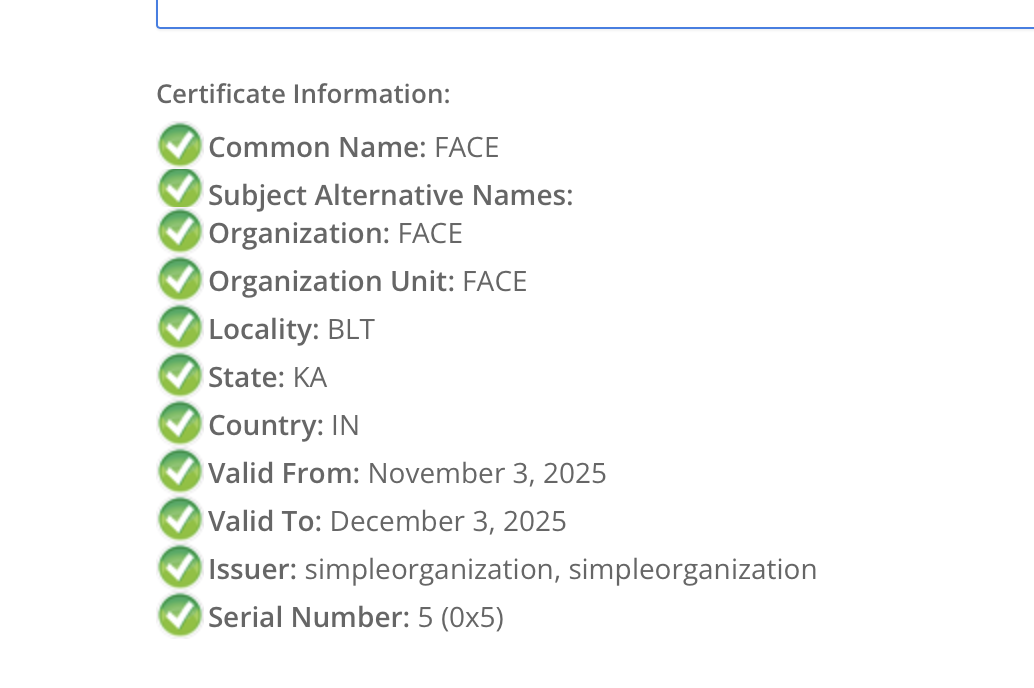
MOSIPDINFO http://127.0.0.1:4501/info response explains the issue, device info response is returned with below x5c value.

MIIGFTCCA/2gAwIBAgIBBTANBgkqhkiG9w0BAQsFADB/MQswCQYDVQQGEwJJTjEMMAoGA1UECAwDQkxUMQswCQYDVQQHDAJLQTEbMBkGA1UECgwSc2ltcGxlb3JnYW5pemF0aW9uMRswGQYDVQQLDBJzaW1wbGVvcmdhbml6YXRpb24xGzAZBgNVBAMMEnNpbXBsZW9yZ2FuaXphdGlvbjAeFw0yNTExMDQwNzMzMzZaFw0yNTEyMDQwNzMzMzZaMFUxCzAJBgNVBAYTAklOMQswCQYDVQQIDAJLQTEMMAoGA1UEBwwDQkxUMQ0wCwYDVQQKDARGQUNFMQ0wCwYDVQQLDARGQUNFMQ0wCwYDVQQDDARGQUNFMIICIjANBgkqhkiG9w0BAQEFAAOCAg8AMIICCgKCAgEAvV3/l2OJOD7jyucp28W1BIInIjpTcJHwE6Fcec5wezcCvZ6x89LZDg4HW4z7k3APUX+gDtOa72zcgH4IrGPu4ZWktg5dEsemFowga4U2+pdaRbhu5YJ9Sp/k9vdsz7tJ3mnvuQaF6CCyLbTnsS84O+0/50PeC02PFKKj9+xvmE7gL1XEEOcnPenFpVaJ8z5t5xVhMfqavuxQm2tY0uwMOknTWdzzQ6Ix1R9EEFknvG0JUazcC5b7ARIvOw3B1GURZqNh9TPGH0HTORvDgO02GiumMaiF6MDVdUbRTipbDqwzoNShWrqdVHbp+HD9EvhUxnYd6DklhHstjyo2iDllTNyaifYwnpaXarhzfS4TABPKORJ69PWwBnvnObN0LDBzlhWA8NflBC5isUloBqNFCs38JstPymono8rI0NzkgM67qcJhVHXoWdj1kLGDrUUkNAO+YxV52rNvazjEHPZW3CjGuJy6NdYeSQqCqvkIeW1LwuaIaEcyKA2MMC4/RWUuzb115pJi9Dye2BayevSB5mq2yW42bKpfp5CDed9BVoP+ybPhdUb2oUilcdg/zL/gaQNMFk4vcSDDF9xG69OFmBOL/372FLhm5qfgQfE6ZMU4EbyhFCPzwJwX2BjwDslaxeP6Ug4p+nn1nNiNp/Dqy7JzlVXWLWhBiFYpI3Yeu5ECAwEAAaOBxTCBwjAJBgNVHRMEAjAAMBEGCWCGSAGG+EIBAQQEAwIFoDAzBglghkgBhvhCAQ0EJhYkT3BlblNTTCBHZW5lcmF0ZWQgQ2xpZW50IENlcnRpZmljYXRlMB0GA1UdDgQWBBQZgqBdL+RRMh6PzB/1hU3GiaEEhjAfBgNVHSMEGDAWgBS0aOkWCzfgx5rMyHNSHQRX+3C3GjAOBgNVHQ8BAf8EBAMCBeAwHQYDVR0lBBYwFAYIKwYBBQUHAwIGCCsGAQUFBwMEMA0GCSqGSIb3DQEBCwUAA4ICAQAbQphrpZ25tYMu/c4bdBsGojtunj706fHSNVFU+tPTIDejkpvC7uVblUtRkqxHEHgSXojo4ox90YfYlN60Qix89yYJe5HiQpeVYp11wSAwgW/O1LJoxQK3eQi2WI1F+rzDBBxT8isRPc8/LvZQmAc54vLjrViy/ZLQ9fRaKzcws2y+3TiFQCzSmnGNkh0t3IhzVniwJ0aqC4dk7L59bfzCTu2Cljlg5E8r7huuO5JoDcyPVcuC5zJzwyk7bvMnxZeDS6wvmHlVveQAAZY2N1rDGbv1ocqcYAhOBZgDUxSIXJ64yTnHdv1kthol9QTNoO2/G3h/McyIGckGkg7+a+jauOoC4+ctV+TuTQFv5NDCl/sYAid9CdJbDHvNuJmnLtzq41fv6EO6FyjOvYlWQ8oJLlH0HQKSTZTB4ZZPXczw6R7HD/iQSxh5KNDCrAdfj5J/O85zwLrQkhLRlhCymvUKhpGA+OCX6jPa2lNCp+Z4JIi6jmUtOmvX6AQPR/abEa93D+yEGRL7HCedgxeLc2FWXetzvwgH2vZL/m4LPSx86ef59uaPoTM3vXSUiwvrqY6K4NBomvtVlQHqHdam0pWB+Vk+3snBaEGK2SvBhmo3EabJCl46TGtKJt/hDyboSy4ZCLLgVV0Q3jIYXObVVjQd3GZyOACfwqnJwmgMuFqKQA==

Here please notice the “issuer” it is “simpleorganization” instead it must be “MOSIP-TECH-CENTER”.

This can happen only when the Device.p12 is not created with valid MOSIP signed certificate.

pkcs12 -export -in D:/mockrom/CA_CERT_UTILITY/signed-Device.crt
-inkey D:/mockrom/CA_CERT_UTILITY/Device.key -out D:/mockrom/CA_CERT_UTILITY/Device.p12 -name "Device

Kindly cross check the certificate added in the Device.12, it should be same as the one issued by PMS.

Actually screenshot from your first post also reflects same issue

$ openssl pkcs12 -in Device.p12 -info -nokeys
Enter Import Password:

MAC: sha256, Iteration 2048
MAC length: 32, salt length: 8
PKCS7 Encrypted data: PBES2, PBKDF2, AES-256-CBC, Iteration 2048, PRF hmacWithSHA256
Certificate bag
Bag Attributes
friendlyName: Device
localKeyID: C1 24 7D B5 28 34 71 94 6C 45 FA E2 E0 E2 03 ED 94 D9 1B D2
subject=C=IN, ST=City, L=City, O=FACE, OU=FACE, CN=FACE
issuer=C=IN, ST=City, L=City, O=CityDP, OU=CityDP, CN=CityDP

FYI:

reg-client.zip –> It is the actual reg-client package

registration-test-utility.zip –> It is reg-client UI test automation package

Thanks & Regards,

MOSIP

Hello, @Anusha_sunkadh .

Is it right steps:

  • I have created RootCA, IntermediateCA and Client certificate with custom Organization Name: simpleorganization.
  • When I have uploaded the Client.cer in Partner management portal and click on “View Certificate”, I copied certificate and save it as mosip-signed.crt file.
  • The Subject in mosip-signed.crt contains the organization “simpleorganization” which I used when creating the certificates. So that’s OK, right?
$ openssl x509 -in mosip-signed.crt -text -noout
Certificate:
    Data:
        Version: 3 (0x2)
        Serial Number:
             (Negative)10:74:fc:82:31:e0:60:22
        Signature Algorithm: sha256WithRSAEncryption
        Issuer: C=IN, ST=KA, L=BANGALORE, O=IITB, OU=MOSIP-TECH-CENTER (PMS), CN=www.mosip.io
        Validity
            Not Before: Nov  4 07:18:57 2025 GMT
            Not After : Nov  4 07:18:57 2026 GMT
        Subject: C=IN, ST=BLT, L=KA, O=simpleorganization, OU=simpleorganization, CN=simpleorganization

When I ran create-device-keystore.sh, it executed:

openssl x509 -req -extensions usr_cert -extfile ./openssl.cnf -days 365 -in Device.csr -CA mosip-signed.crt -CAkey Client.key -set_serial 05 -out signed-Device.crt

Here, mosip-signed.crt - signed by MOSIP.
But the Issuer of the new certificate (signed-Device.crt) becomes the Subject of mosip-signed.crt, i.e., “simpleorganization”.

$ openssl x509 -in signed-Device.crt -text -noout
Certificate:
    Data:
        Version: 3 (0x2)
        Serial Number: 5 (0x5)
        Signature Algorithm: sha256WithRSAEncryption
        Issuer: C=IN, ST=BLT, L=KA, O=simpleorganization, OU=simpleorganization, CN=simpleorganization
        Validity
            Not Before: Nov  4 07:33:36 2025 GMT
            Not After : Dec  4 07:33:36 2025 GMT
        Subject: C=IN, ST=KA, L=BLT, O=FACE, OU=FACE, CN=FACE

Therefore, when we export signed-Device.crt into Device.p12, the resulting certificate will have the same Issuer - “simpleorganization”.

So I don’t know how to get the Issuer “MOSIP-TECH-CENTER” in a certificate that was signed using mosip-signed.crt whose Subject is “simpleorganization”. It seems possible only if I obtain mosip-signed.crt in another way, by not uploading “simpleorganization” certs to the Partner management portal.

As I understand:

Level Subject Issuer Where can get it
Device FACE simpleorganization signed by device-provider certificate
Device Provider simpleorganization MOSIP-TECH-CENTER View Certificate for device Provider
Root MOSIP-TECH-CENTER self-signed - (built in PMP)

Thanks for helping and best regards.

Hi Igor you are right,

Do you see an entry in master.ca_cert_store with subject “simpleorganization” and issuer as MOSIP-TECH-CENTER (PMS).

can you confirm if this is present? If yes, can you once trigger cacertificates sync in reg-client and check if devices are discovered.

Thanks & Regards,

MOSIP

Hi, @Anusha_sunkadh

Yes, database has one entry.

Can I trigger device scanning by restarting the reg-client, or do I need to click the Synchronize Data button (or another button) in the reg-client?
When I start the reg-client, nothing changes — 0 devices are discovered. When I click Synchronize Data, I get a “Failed” message.

In logs I have:

2025-11-07 14:31:42,174 ERROR [Thread-32] i.m.r.u.a.RestClientAuthAdvice : UNKNOWN ERROR >> https://api-internal.mosip.mosip.local.com/v1/syncdata/getCertificate?applicationId=KERNEL&version=1.2.0.2&referenceId=SIGN {}
org.springframework.web.client.HttpServerErrorException: 500 Internal Server Error

Is it the reason?

Why is this endpoint failing with 500, any logs in syncdata-service ?

Hi, @Anusha_sunkadh

Here are the logs before I entered the login username in the registration client:

Syncdata Log:

Regclient Log:

Ok,

Can you confirm if “aud” or “azp” claim is present in the auth token issued with username and pwd login? can you try to get one with the below authmanager endpoint

curl -X 'POST' \
  'https://yourdomain/v1/authmanager/authenticate/internal/useridPwd' \
  -H 'accept: */*' \
  -H 'Content-Type: application/json' \
  -d '{
  "id": "string",
  "version": "string",
  "requesttime": "2025-11-11T18:53:44.473Z",
  "metadata": {},
  "request": {
    "userName": "enter you reg-client password here",
    "password": "enter your password here",
    "appId": "registrationclient",
    "clientId": "mosip-reg-client",
    "clientSecret": "replace-with-reg-client-secret-here"
  }
}'

In the meantime, you could disable the “audience” check using “auth.server.admin.audience.claim.validate” property in the application-default.properites to see if the request is passing without audience check.

Refs: mosip-openid-bridge/kernel/kernel-auth-adapter/src/main/java/io/mosip/kernel/auth/defaultadapter/helper/ValidateTokenHelper.java at master · mosip/mosip-openid-bridge · GitHub

Note: This is strictly not recommended in production. Only use it for debug